Foodle - The Original List6.1
Publisher Description


The world’s best shopping list for Stephen Elliott.
What folks have said about Foodle over the past 18 years:
"I have no idea how I managed without it." -Gaia50
"Simple, quick, and easy to use. I tried three other list programs before this, and it's perfect for me. It's great for shopping, to-do lists and just keeping track of stuff." -Varkias
"The feature that sets Foodle above the rest is the 'shake to sort'. As you prowl the aisles and tick off each item you just shake the phone and the ticked items go to the bottom, leaving you with the outstanding items at the top. This is a very useful feature and still makes me smile." -Geoff
"Foodle is now my only list app." -Cindy
Foodle’s features:
- Create an unlimited number of shopping and general-purpose lists
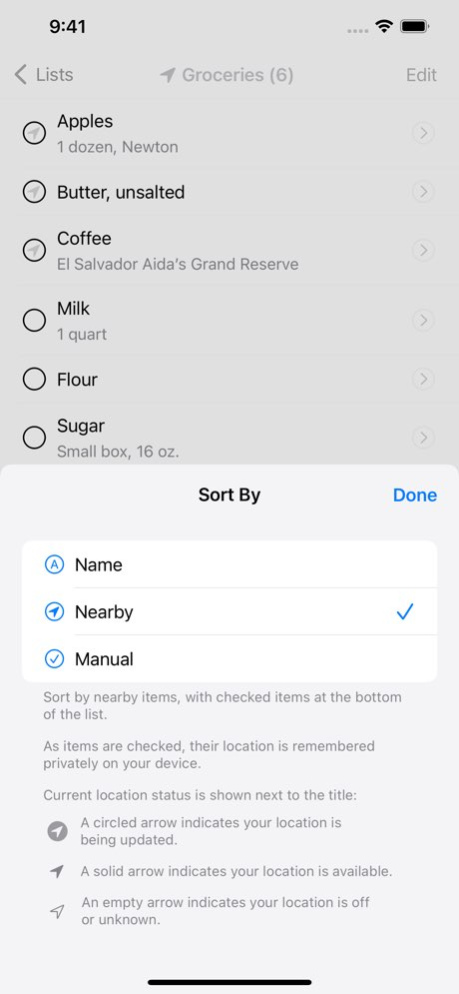
- Location-aware shopping remembers your shopping habits and identifies nearby items
- Shakedown (shake-to-sort) orders your list with the flick of a wrist
- Share lists easily in Markdown format; import with one touch
- Auto-Complete suggestions speed item entry, offer foods and ingredients - not corporate brands
- Vegetarian and vegan friendly; fully tailor Auto-Complete for your needs
- Customize lists with colors, sorting options
- Support for Dynamic Type and Dark Mode to keep Foodle easy on your eyes
- Sync lists across all your devices with iCloud Lists
Enjoy making lists at the speed of thought and grocery shopping as easy as a shake.
Version History - New Liquid Glass design for iOS 26
- Support for iPhone 17e 6.1 Apr 27 - Support for iPhone 16e 6.0.3 02/28/2025 - iOS 18 improvements 6.0.2 01/10/2025 - iOS 18 compatibility 6.0.1 09/16/2024 Ubiquitous lists! This release brings iCloud Lists to Foodle.
To enable: in Foodle, navigate to General (Settings) > iCloud Lists
Notes:
- Added iCloud support for synchronized lists across devices
- Improved localizations
- Improved iPad color chooser cursor hover activity
- Improved timing of the location permission request dialog display
- Improved layout for the iPad Mini
- Various UI improvements 6.0 08/01/2024 - Added the ability to tap on an item on the navigation sidebar in iPadOS to ‘pop’ back to the beginning of the section
- Improved general navigation presentation
- Improved keyboard shortcuts
- Improved color picker
- Improved compatibility with Dynamic Type 5.1.1 03/19/2024 This release offers welcome improvements for the iPad. It also includes a new QuickStart guide.
Notes:
- Improved iPad window resizing when used with Stage Manager
- Improved iPad rotation transitions
- Improved iPad column view behavior
- Improved iPad item entry and detail editing UI
- Improved iPad map sizing and animations in Location settings
- Improved editing of items with extra long names
- Improved display of newly imported lists
- Added QuickStart guide 5.1 03/12/2024 - iPadOS 17 Stage Manager improvements 5.0.3 02/06/2024 - iOS 17 improvements 5.0.2 02/02/2024 Details, details, details! This release improves many useful details.
Notes:
- Added the ability to open iOS Settings directly from system permission alerts
- Enabled keyboard shortcuts for compact (non-iPad) devices with external keyboards
- Updated list title’s ‘updating location’ icon for improved clarity, and to better align with Apple’s standards
- Improved hardware keyboard behavior
- Enhanced cancel button to hide visible suggestions after a long-press
- Refined interactions with system-level location and notification permissions 5.0.1 08/08/2023 5.0 07/17/2023
About Foodle - The Original List
The company that develops Foodle - The Original List is Stephen Elliott. The latest version released by its developer is 6.1.
To install Foodle - The Original List on your iOS device, just click the green Continue To App button above to start the installation process. The app is listed on our website since 2026-10-06 and was downloaded 2 times. We have already checked if the download link is safe, however for your own protection we recommend that you scan the downloaded app with your antivirus. Your antivirus may detect the Foodle - The Original List as malware if the download link is broken.
How to install Foodle - The Original List on your iOS device:
- Click on the Continue To App button on our website. This will redirect you to the App Store.
- Once the Foodle - The Original List is shown in the iTunes listing of your iOS device, you can start its download and installation. Tap on the GET button to the right of the app to start downloading it.
- If you are not logged-in the iOS appstore app, you'll be prompted for your your Apple ID and/or password.
- After Foodle - The Original List is downloaded, you'll see an INSTALL button to the right. Tap on it to start the actual installation of the iOS app.
- Once installation is finished you can tap on the OPEN button to start it. Its icon will also be added to your device home screen.
Program Details
System requirements
Download information
Pricing
Version History
version 6.1
posted on 2026-10-06
Version History - New Liquid Glass design for iOS 26
- Support for iPhone 17e 6.1 Apr 27 - Support for iPhone 16e 6.0.3 02/28/2025 - iOS 18 improvements 6.0.2 01/10/2025 - iOS 18 compatibility 6.0.1 09/16/2024 Ubiquitous lists! This release brings iCloud Lists to Foodle.
To enable: in Foodle, navigate to General (Settings) > iCloud Lists
Notes:
- Added iCloud support for synchronized lists across devices
- Improved localizations
- Improved iPad color chooser cursor hover activity
- Improved timing of the location permission request dialog display
- Improved layout for the iPad Mini
- Various UI improvements 6.0 08/01/2024 - Added the ability to tap on an item on the navigation sidebar in iPadOS to ‘pop’ back to the beginning of the section
- Improved general navigation presentation
- Improved keyboard shortcuts
- Improved color picker
- Improved compatibility with Dynamic Type 5.1.1 03/19/2024 This release offers welcome improvements for the iPad. It also includes a new QuickStart guide.
Notes:
- Improved iPad window resizing when used with Stage Manager
- Improved iPad rotation transitions
- Improved iPad column view behavior
- Improved iPad item entry and detail editing UI
- Improved iPad map sizing and animations in Location settings
- Improved editing of items with extra long names
- Improved display of newly imported lists
- Added QuickStart guide 5.1 03/12/2024 - iPadOS 17 Stage Manager improvements 5.0.3 02/06/2024 - iOS 17 improvements 5.0.2 02/02/2024 Details, details, details! This release improves many useful details.
Notes:
- Added the ability to open iOS Settings directly from system permission alerts
- Enabled keyboard shortcuts for compact (non-iPad) devices with external keyboards
- Updated list title’s ‘updating location’ icon for improved clarity, and to better align with Apple’s standards
- Improved hardware keyboard behavior
- Enhanced cancel button to hide visible suggestions after a long-press
- Refined interactions with system-level location and notification permissions 5.0.1 08/08/2023 5.0 07/17/2023
version 6.0.3
posted on 2025-02-28
Feb 28, 2025
Version 6.0.3
- Support for iPhone 16e
version 6.0.3
posted on 2025-02-28
- Support for iPhone 16e
version 6.0.2
posted on 2025-01-10
Jan 10, 2025
Version 6.0.2
- iOS 18 improvements
version 6.0.1
posted on 2024-09-16
Sep 16, 2024
Version 6.0.1
- iOS 18 compatibility
version 6.0
posted on 2024-08-01
Aug 1, 2024
Version 6.0
Ubiquitous lists! This release brings iCloud Lists to Foodle.
To enable: in Foodle, navigate to General (Settings) > iCloud Lists
Notes:
- Added iCloud support for synchronized lists across devices
- Improved localizations
- Improved iPad color chooser cursor hover activity
- Improved timing of the location permission request dialog display
- Improved layout for the iPad Mini
- Various UI improvements
version 5.1.1
posted on 2024-03-19
Mar 19, 2024
Version 5.1.1
- Added the ability to tap on an item on the navigation sidebar in iPadOS to ‘pop’ back to the beginning of the section
- Improved general navigation presentation
- Improved keyboard shortcuts
- Improved color picker
- Improved compatibility with Dynamic Type
version 5.0.3
posted on 2024-02-06
Feb 6, 2024
Version 5.0.3
- iPadOS 17 Stage Manager improvements
version 5.0.2
posted on 2024-02-02
Feb 2, 2024
Version 5.0.2
- iOS 17 improvements
version 5.0.1
posted on 2023-08-08
Aug 8, 2023
Version 5.0.1
Details, details, details! This release improves many useful details.
Notes:
- Added the ability to open iOS Settings directly from system permission alerts
- Enabled keyboard shortcuts for compact (non-iPad) devices with external keyboards
- Updated list title’s ‘updating location’ icon for improved clarity, and to better align with Apple’s standards
- Improved hardware keyboard behavior
- Enhanced cancel button to hide visible suggestions after a long-press
- Refined interactions with system-level location and notification permissions
